
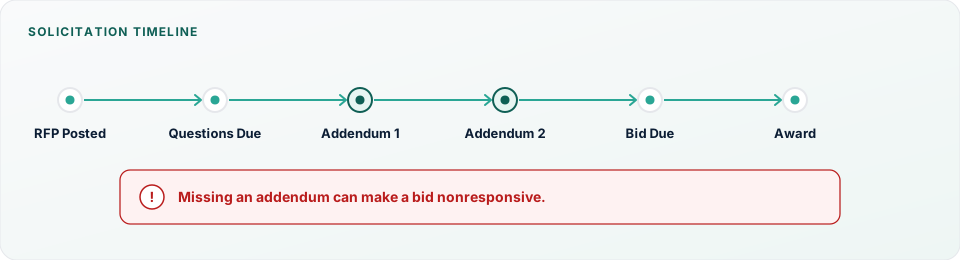
- RFP Posted
- Questions Due
- Addendum 1
- Addendum 2
- Bid Due
- Award
Missing an addendum can make a bid nonresponsive.
A bid addendum is one of the most important documents issued during a public procurement. It is a formal revision to the solicitation after the original issue date—and once published, it becomes part of the bid documents you are expected to follow. In Florida public procurement, silence is not a strategy: your response is generally expected to reflect every issued addendum.
Many contractors lose government contractor opportunities not because of pricing, but because they fail to recognize or properly incorporate addenda. An overlooked drawing revision, a changed bid form, or a missed acknowledgment can make an otherwise competitive package nonresponsive. That risk is especially high in public construction bidding, where multiple addenda on one solicitation are common.
Florida public agencies use addenda to clarify requirements, answer bidder questions, revise specifications, extend deadlines, correct errors, or issue additional drawings. Every government bid addendum becomes part of the solicitation and must be reviewed carefully by estimators, project managers, proposal managers, and business development staff before submission.
If your team pursues Florida government bids across multiple counties, addenda risk compounds: different portals, different notification settings, and different acknowledgment forms. Building a repeatable review habit matters as much as finding the opportunity in the first place. For how Florida opportunities are published, see How to Find Florida Government Construction Bids and Florida Procurement Platforms Explained.
What is a bid addendum?
Formally, a bid addendum (plural: bid addenda) is a written modification to a solicitation issued by the owner or purchasing office after the original documents were released and before bids or proposals are due. Public procurement addenda are official. They are not optional clarifications you can ignore if they seem minor.
Agencies issue addenda because the original package is rarely perfect once bidders start asking questions and reviewing drawings. A roofing specification may conflict with a detail sheet. A quantity may be wrong. A pre-bid date may need to move. The addendum is how the agency corrects the record for every vendor at once.
The legal significance is practical: when you submit, you are typically bidding on the solicitation as amended. If Addendum 2 revises a bid form or changes insurance limits, submitting the original form or pricing to the old requirement can make your bid nonresponsive—even if your number would have won.
An addendum is not the same as a contract amendment or a change order. An addendum revises the solicitation before award. A contract amendment or change order modifies an executed contract after award. Confusing those terms leads teams to treat pre-bid solicitation revisions casually—exactly when discipline matters most.
Addenda are typically released after questions are due, after a pre-bid meeting, or whenever the agency discovers an error that must be corrected before opening. Some agencies issue a “final” addendum close to the deadline that consolidates answers and revised sheets—exactly when teams are busiest finalizing numbers.
Contractors must acknowledge addenda when the solicitation requires it—often by signing an acknowledgment page, checking a portal box, or listing addendum numbers on the bid form. Example: if the bid form asks you to list Addenda 1–3 and you leave that blank, purchasing may reject the package for failure to confirm addendum acknowledgment. Another common example: an electronic portal requires you to open each addendum file before it unlocks submission. If your estimator never logged in, the proposal manager may discover the block an hour before due time.
Why agencies issue addenda
Agencies issue construction bid addenda for many reasons:
- Answering bidder questions so all vendors receive the same clarification
- Correcting errors in drawings, specifications, or schedules
- Clarifying specifications that conflict or are ambiguous
- Revising quantities on unit-price or allowance items
- Updating drawings or issuing additional sheets
- Revising contract language or general conditions
- Extending bid deadlines when the package changes late
- Changing mandatory meeting dates or locations
- Revising insurance requirements or bonding language
- Modifying technical requirements that affect means, methods, or materials
Multiple addenda on one solicitation are common—especially on larger Florida construction bids and complex renovations. Do not treat Addendum 1 as the last word. Keep checking until the submission window closes, or until the agency states that no further procurement revisions will be issued.
Also remember that addenda can interact. Addendum 2 may revise a sheet that Addendum 1 already changed. Your file set should include every issued revision, and your takeoff should reflect the latest controlling sheet—not a mix of versions from different download days.
Where contractors find addenda
Depending on the agency, addenda may appear in several places:
- Procurement portals attached to the opportunity record
- Agency websites on the same page as the solicitation PDF list
- Bonfire opportunity pages and document packages
- DemandStar solicitation records and downloads
- VendorLink bid tabs and document libraries
- OpenGov procurement modules and opportunity messaging
- CGI Advantage Vendor Self Service boards
- Email notifications to registered vendors
- Vendor dashboards inside the platform where you registered interest
Never assume email notifications alone are sufficient. Messages can land in spam, go to an outdated contact, or arrive after your team has already finalized pricing. Some agencies notify only vendors who registered interest on that opportunity; if someone on your team viewed documents without registering, you may receive nothing.
Manually check the procurement portal for every active pursuit before you submit—ideally every business day after you open the pursuit, and again on bid morning. Note where each agency publishes revisions the day you download plans. County guides such as the Orange County Procurement Guide, Hillsborough County Procurement Guide, and Miami-Dade Procurement Guide help map those owners and their typical platforms.
What contractors should review in every addendum
Read the full addendum, not only the cover summary. Check for changes to:
- Revised drawings and detail sheets
- Specifications and technical requirements
- Scope of work language
- Bid forms, unit-price sheets, and proposal formats
- Quantities and allowances
- Contract language and general conditions
- Insurance requirements and bonds
- Deadlines, mandatory meetings, and bid opening dates
Seemingly minor solicitation revisions can significantly impact pricing. A one-sentence specification change can alter material grade. A quantity update can move a unit-price extension. A new insurance endorsement can change your cost of risk. A revised bid form can invalidate the PDF you already filled out. A changed liquidated damages clause can affect contingency. Treat every page as potentially price-affecting until you prove otherwise.
When an addendum says “see attached revised drawings,” open every attached sheet—do not stop at the narrative summary. Agencies sometimes summarize only the major items while the attachments contain additional clouded changes that affect trades you subcontract.
A practical addenda tracking process
Use this best-practice workflow on every active pursuit:
- Assign ownership. One person owns addenda monitoring for that solicitation until submission.
- Monitor procurement portals daily. Check the opportunity record even if no email arrived.
- Download every addendum. Save the full file set the same day it posts.
- Rename files consistently. Example:
ITB-123_Addendum-02_2026-08-01.pdfso version control is obvious. - Compare revised drawings. Diff sheets side-by-side; do not rely on memory of the first download.
- Notify estimating. Flag scope, quantity, and specification changes before takeoff continues.
- Notify subcontractors. Send revised bid documents and confirm receipt in writing.
- Revise pricing. Update assumptions, unit prices, and contingencies to match the amended package.
- Confirm acknowledgment requirements. Know whether you must sign, list, or check addendum numbers.
- Verify the final submission package. Confirm forms, attachments, and portal uploads match the latest addenda.
Log each addendum number, release date, and summary in your bid calendar or pursuit file. Include who was notified internally and which subcontractors received the revision. The log is how proposal managers prove the team incorporated procurement revisions when questions arise on bid day—and how you recover quickly if a team member is out sick the morning of submission.
If your company runs multiple Florida government bids at once, standardize the naming and logging format across pursuits. Consistency makes handoffs between estimators and proposal managers safer under deadline pressure.
Common mistakes contractors make
These mistakes repeatedly affect responsiveness on public works bids:
- Missing the final addendum — the last revision often changes forms or deadlines
- Pricing from outdated drawings — takeoff continues on the first download while sheets change
- Assuming email notifications are complete — contacts change; spam filters fail; notices lag
- Forgetting subcontractors — your number updates, but quotes still reflect old scope
- Ignoring revised specifications — “minor” language changes materials or methods
- Missing deadline extensions — or worse, missing a shortened question window
- Failing to acknowledge addenda — a completeness issue even when pricing is current
- Downloading documents only once — treating the plan room as static
- Assuming revisions are minor — then discovering a bid-form change at upload time
Each mistake can make a bid nonresponsive or force a last-minute scramble that introduces pricing error. In government contracting, process discipline is part of competitiveness. A clean number on outdated documents is still the wrong bid. A complete number submitted on the wrong form is still at risk. Build your controls so “we thought that was the latest package” never becomes the explanation after a rejection.
Best practices
Use this checklist on every Florida government bid you pursue:
- Review procurement portals daily for active pursuits
- Assign one person responsibility for addenda until submission
- Keep version control with consistent file names and a bid log
- Compare drawings side-by-side when sheets are reissued
- Update estimating assumptions the same day revisions post
- Communicate revisions internally to estimating, PM, and proposal staff
- Confirm subcontractor pricing reflects the latest documents
- Review acknowledgments before submission—not after upload fails
- Re-download the opportunity package on bid morning if the portal allows
- Record where each agency publishes addenda in your source list
Weekly market context can help leadership stay aware of procurement activity while pursuit owners run day-to-day checks—formats such as Florida Public Procurement Weekly support that broader view.
Frequently asked questions
What is a bid addendum?
A bid addendum is a formal written revision to a solicitation issued before bids or proposals are due. It becomes part of the bid documents and may change drawings, specifications, forms, dates, or other requirements.
Are addenda legally binding?
For practical bidding purposes, yes—you are expected to bid on the solicitation as amended. Ignoring a published addendum can make your submission nonresponsive even if your price would otherwise be competitive.
Can I submit a bid without acknowledging an addendum?
Often no. Many solicitations require addendum acknowledgment on a form, checklist, or portal field. Submitting without the required acknowledgment is a common reason packages are rejected. Always follow the solicitation’s instructions.
How often are addenda issued?
It varies. Simple maintenance bids may have none or one. Complex renovations and large public construction bidding packages may issue several. Plan as if additional addenda are possible until the deadline passes.
Where should contractors check for new addenda?
Check the same procurement portal or agency page where the solicitation and bid documents live. Also review vendor dashboards and email, but do not rely on email alone. Confirm the posting location the day you download plans.
Can an addendum change the bid deadline?
Yes. Extending—or occasionally adjusting—bid deadlines is a common use of addenda. Always re-check dates after every revision and update your internal bid calendar immediately.
Conclusion
Successful public-sector contractors build disciplined processes for monitoring and reviewing addenda. Consistently tracking solicitation revisions reduces risk, improves compliance, and prevents avoidable bid disqualifications—especially in Florida public procurement, where opportunities span many agencies and platforms.
Assign ownership, check portals daily, download every revision, update pricing and subcontractors, and confirm acknowledgment requirements before you submit. That workflow is as important as the estimate itself.
Northline Intelligence monitors Florida public agencies every business day and highlights newly issued solicitations and procurement updates, helping contractors identify opportunities earlier in the procurement process—when there is still time to track addenda properly and build a complete, responsive package.
Spend less time finding bids—more time reviewing them
Northline Intelligence helps your team discover Florida opportunities earlier in the cycle so you have time to track addenda properly.
Subscribe to Northline Intelligence